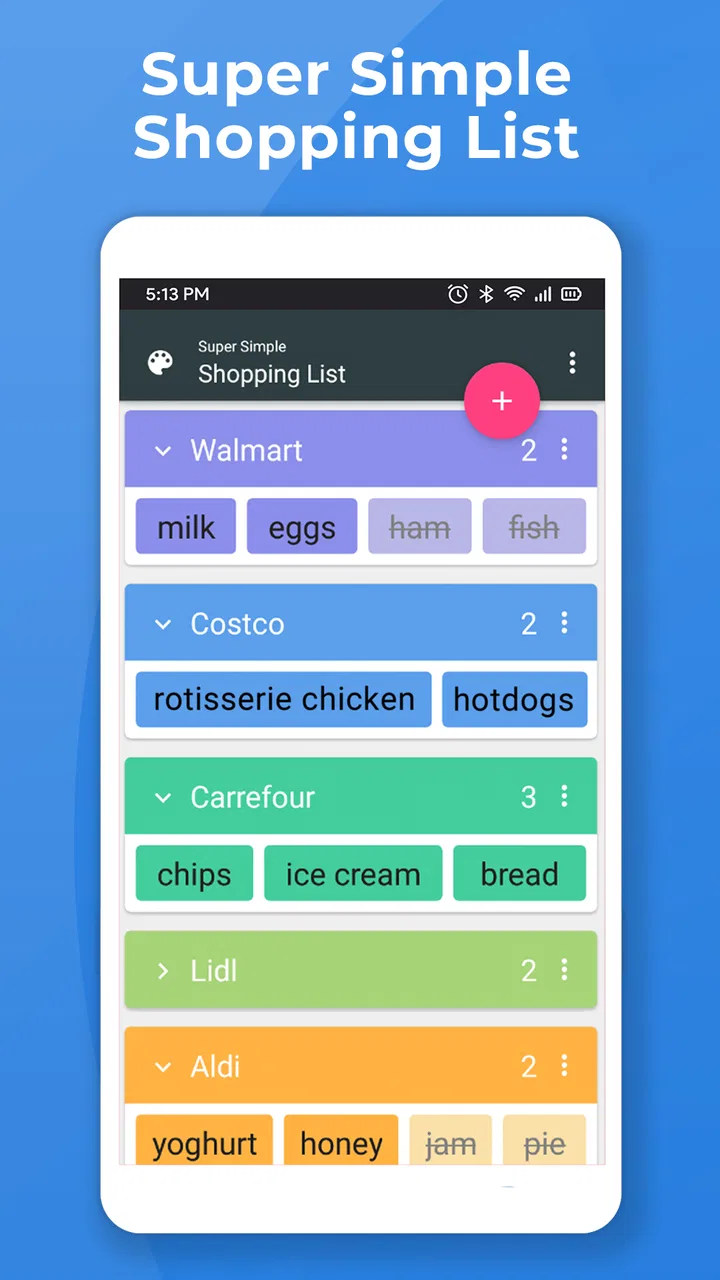
Super Simple Shopping List
- 3.6
- Rating
- 1.00M
- Installs
- Free
- Price

 Analysis by App-foxy
I like shopping-list apps that stay out of the way, and Super Simple Shopping List is built around exactly that idea. It is a free shopping app from Maple Media for creating lists, arranging grocery errands, and moving items toward a cart without turning a quick supermarket visit into a project-management exercise. After using it, my impression is that its appeal comes from restraint: it focuses on getting items written down and keeping them visible.
That simplicity is also the key question. If you want a lightweight list for groceries, household supplies, or a short errand, this app makes sense. If you expect a full grocery platform with product discovery, delivery coordination, shared planning, recipes, loyalty tools, or detailed spending analysis, you may find it too narrow. I would describe it as a practical checklist rather than a complete shopping ecosystem.
How Super Simple Shopping List feels in everyday use
I find Super Simple Shopping List most useful when I treat it as a quiet helper, not as the place where every household decision has to live. A good test is to add a few items during the week, then see whether the list still makes sense when I’m distracted and ready to leave. That everyday rhythm leads naturally to a closer look at what I can actually verify and control.
You May Also Like

 Blood Strike: 2.5 Anniversary
Blood Strike’s Loadouts Turn Every Drop Into a Tactical Gamble
A close look at Blood Strike’s custom loadouts: how fast access to signature weapons reshapes its battle royale rhythm, rewards preparation, and narrows the gap between fights.

 Pandora - Music & Podcasts
Pandora’s Music Is Easy to Start, but Harder to Recover
Pandora’s strength is its low-effort path from a seed to a station. Its weak spot is how much confidence it asks you to place in connection, setup, and quiet recovery.

 8 Ball Pool
 Is Built on Rivalries, Rematches, and Routine
A close look at the rivalries, rematches, shared routines, and unanswered safety questions that turn a quick pool match into a persistent mobile community.

 Samsung Music
’s Quiet Strength Is Playing What You Already Own
Its reach comes less from spectacle than from dependable access to a personal library. That simplicity is both the app’s strongest retention engine and its ceiling.

 AccuWeather: Weather Radar
AccuWeather Review: A Quick, Clear Forecast for Everyday Decisions
For everyday plans, the best forecast is the one you can understand quickly. AccuWeather makes rain timing, radar, and local conditions easy to act on, with a few trade-offs.

 Hill Climb Racing
Why Hill Climb Racing Still Turns Crashes Into One More Run
A tiny car, a bumpy hill and one more upgrade: Hill Climb Racing keeps resurfacing because its simple chaos makes every near-miss feel personal.
More From Our News Desk
View All News


A quick start for ordinary shopping
The first thing I noticed is how naturally the app fits a short planning routine. I can think through what I need, add the items, and use the resulting list while shopping. That sounds basic, but it matters. Many shopping tools add so many layers that entering one item feels slower than writing it on paper. This app’s purpose is clearer: capture the purchase, organize the errand, and refer back to the list when it matters.
A realistic example is a midweek grocery run after work. I might add milk, vegetables, bread, cleaning supplies, and a few items for breakfast. Rather than trying to remember everything in the store, I use the list as a visual prompt. The value is not in elaborate planning; it is in reducing the small mental load of remembering several unrelated things at once.
The store summary describes list creation, grocery organization, and adding items to a cart. In practice, I see those as three stages of the same workflow. I first capture what I need, then make the list easier to follow, and finally use it as I move through the errand. That makes the app particularly suitable for people who want a simple record of purchases without building a detailed household database.
Speed expectations: quick because the scope is small
Super Simple Shopping List feels designed for short interactions rather than long sessions. You open it, add or review an item, and return your attention to the rest of the day. That limited scope gives it a perceived speed advantage over shopping apps that load catalogs, recommendations, accounts, or store-specific information before you can make a basic list.
I would not choose it because I need a sophisticated shopping engine. I would choose it because the path from thought to checklist is uncomplicated. For a person who remembers an item while cooking, the useful test is whether it can be recorded before the thought disappears. For a parent preparing a quick supermarket trip, the test is whether the list remains understandable when attention is divided. This app is aimed at those moments.
There is an important trade-off here. A minimal interface can feel fast because it presents fewer decisions, but it also leaves more organization to the user. If you want automatic product matching, detailed categories, or a richer search experience, another shopping service may save time later even if it takes longer to set up initially.
Organizing a list without overplanning
The app works best when I treat each list as a focused errand. For example, I might keep one list for a regular grocery trip and another for household items that can wait. This prevents a long collection of reminders from becoming a single noisy checklist. The practical insight is to separate urgency by trip, not just by product type. A list for “tonight’s shop” is easier to use than one that mixes future purchases with immediate needs.
I also find it useful to add items as soon as I notice them rather than trying to reconstruct the entire list immediately before leaving. That approach turns the app into a small memory aid throughout the week. When shopping day arrives, the list reflects real needs rather than whatever I happen to remember at the door.
For a shared household, the app can still be useful as a central reference if everyone follows the same habit, but I would not assume that a basic list automatically solves coordination. The household needs a clear routine: one person maintains the list, or everyone agrees on how items are added and removed. Without that agreement, even a good checklist can become outdated.
Heavy-use moments and the limits of minimalism
The most demanding use case is not necessarily technical. It is a large, messy shopping trip with many items, substitutions, and changing priorities. A short list is easy to scan. A long list requires more discipline from the person using it, especially if products are entered in an inconsistent order or with vague names. “Snacks” may be enough for one person, while “plain crackers for lunch boxes” is more useful for another.
My advice is to write entries for the version of yourself who will be in the store later. Include a useful qualifier when it affects the purchase, such as size, flavor, or purpose. This is one of the app’s hidden trade-offs: because it does not force a detailed product form, you have freedom, but the clarity of the final list depends on your wording.
Another practical workflow is to review the list before leaving and remove anything that is no longer needed. A simple list can become cluttered when plans change. Cleaning it up before the trip makes the app feel faster in the aisle and reduces the chance of buying something simply because it remained visible.
Using the cart idea during the errand
The cart-oriented part of the experience gives the list a natural finish. I think of it as a transition from “things I intend to buy” to “things I have handled.” That distinction is useful when a trip includes several stops or when I am interrupted halfway through shopping. Instead of relying on memory, I can see what still needs attention.
This is especially helpful for errands with a mixture of routine and optional items. I can focus first on essentials, then return to the remaining entries if time or budget allows. The app does not need to make that decision for me; the visible list provides enough structure for me to make it quickly.
Still, I would not confuse a cart checklist with live inventory or an online order. A listed item is not proof that a store has it, and adding something to the cart does not replace checking the product in front of me. People who need delivery tracking, substitutions, or store availability should look toward a dedicated retailer or grocery-delivery app instead.
Reliability in the small moments
For this kind of app, reliability means more than avoiding crashes. It means being able to trust the list when I am standing in a busy aisle, switching between items, or returning to an errand after a distraction. The simpler the task, the more noticeable any friction becomes. If a list is hard to scan or an item’s status is unclear, the whole purpose is weakened.
My overall view is that the focused design supports dependable use because there are fewer layers between the list and the errand. That is an observation about the app’s narrow role, not a promise that every device or situation will behave identically. The current release is version 4.0.2(25058), and the app has been available since December 18, 2014, so it is not a brand-new experiment. Its long presence suggests a product that has had time to establish its basic identity.
When I use a simple list, I also care about recovery after interruption. A shopping app should fit into uneven attention: I may put the phone away, answer a message, compare products, or leave the store and return later. The best habit is to update the list at clear moments rather than after every tiny movement. Mark an item once it is genuinely handled, then pause before moving on. That reduces uncertainty if the errand is interrupted.
There is a broader reliability lesson here. No checklist can protect against an unclear workflow. If several people edit the same shopping plan without a shared method, the problem is usually coordination rather than the app itself. I would use it confidently for personal lists and straightforward household routines, while being more cautious about treating it as a complete family logistics system.
Device constraints and practical compatibility
The app requires Android 6.0 or later, which gives it a relatively broad starting point for Android users with older phones. That matters for households that keep a secondary device in the kitchen or use an older phone for errands. At the same time, compatibility is not the same as identical performance on every handset. The experience can still depend on the phone’s age, available storage, background activity, and the way the device handles older applications.
Because the app is centered on lists rather than media-heavy content, I would expect its everyday role to be less demanding than a shopping service built around product images, video, or live catalogs. I am careful not to turn that into a measured battery or memory claim, but the limited purpose is reassuring for someone who wants a practical utility rather than another visually intensive service.
If you are using an older Android phone, the sensible approach is to keep expectations realistic. A basic list should be comfortable for quick entries, but large lists, frequent switching, or a device already struggling with other apps may feel less smooth. Before relying on it for a major trip, I would create a small test list, close and reopen the app, and confirm that the workflow feels clear on your own device.
The age rating is Everyone, which fits the straightforward subject matter. The app is free to install, with in-app purchases ranging from $0.99 to $9.99 per item. I would still check the purchase screens before committing to any optional extras, especially if the goal is simply to maintain a basic grocery checklist. For many users, the important question is not whether the app can do more, but whether the free experience already covers their routine.
Where it compares well with paper and larger shopping apps
Compared with paper, the app is easier to revise. I can add an item after making the original list, remove something that is already at home, and use the cart-oriented workflow while moving through the store. Paper remains excellent for people who enjoy writing by hand or do not want to use a phone during shopping, but it becomes less convenient when plans change repeatedly.
Compared with a notes app, this product has a more specific purpose. A general note can hold a shopping list, but it may also contain unrelated reminders, paragraphs, or old versions of the same list. A dedicated shopping tool makes the errand the center of attention. That focus is the main reason I would pick it over a blank note.
Compared with retailer and delivery apps, the difference is much larger. Those services are better when I need prices, product images, availability, delivery windows, or an order history. Super Simple Shopping List is better when I already know what I need and want a clean place to remember it. Choosing between them depends on whether the hard part is planning the purchase or completing the transaction online.
Compared with feature-rich list managers, this app may be easier for a casual user but less satisfying for someone who wants detailed recurring tasks, household assignments, or elaborate categories. I would not call that a weakness in isolation. It becomes a weakness only when the user expects the app to grow into a full planning system.
Who should use it, and who should skip it
I would recommend it to someone who wants a dedicated grocery checklist without a large learning curve. It also suits people who frequently make short trips, keep separate lists for different errands, or need a simple memory aid for household purchases. Someone moving from paper to a phone may appreciate that the app does not demand a complete change in shopping habits.
It is also a reasonable choice for an older Android device that meets the minimum operating-system requirement and is mainly used for practical utilities. The app’s free entry point makes it easy to try without treating the decision as a major commitment. The average rating is 3.5 from around twelve thousand ratings, while more than six hundred written reviews and over one million installs indicate that it has attracted a substantial audience. I read those figures as evidence of broad interest, not as a guarantee that every user will find the workflow ideal.
I would skip it if your shopping depends on real-time store information, online checkout, delivery management, or detailed budgeting. I would also look elsewhere if several household members need sophisticated assignment and synchronization tools. In those cases, a retailer app, delivery service, or more advanced shared-list product may justify its extra complexity.
Small habits that make the app more useful
My first tip is to create lists around actual trips instead of maintaining one endless master list. This keeps the screen readable and makes the cart stage meaningful. My second is to add context only when it prevents a mistake. A short entry such as “coffee for guests” can be more useful than a generic “coffee,” while unnecessary detail slows down entry.
My third tip is to perform a pre-trip reset. Scan the list once at home, remove duplicate entries, clarify anything vague, and decide which items are essential. This turns the app from a passive memory dump into a usable route through the errand. It also reduces the chance of discovering in the store that an item was added weeks ago for a plan that no longer exists.
Finally, I would use the cart state as a checkpoint rather than rushing through it. If the trip is interrupted, the list should tell me what remains. That is a modest feature of a modest app, but it can be more valuable than a long list of advanced tools when the real problem is simply losing track of what has already been picked up.
My performance verdict
Super Simple Shopping List succeeds when I judge it by the job it sets out to do. It offers a focused way to capture purchases, arrange a grocery errand, and keep track of items as the trip progresses. Its perceived speed comes from avoiding the weight of a full shopping platform, while its main limitations come from that same decision. The user receives a cleaner checklist, but not the broader information and automation found in larger services.
For stability and recovery, I value the straightforward workflow more than a long feature list. A short, clear list is easy to revisit after an interruption, and separate trip-based lists can keep heavy use manageable. I would still test it on an older device before depending on it for a major shop, particularly if the phone already has performance problems.
Maple Media’s app is not the right answer for every kind of shopping. It is not a substitute for online ordering, inventory checking, or household project management. But if your goal is to stop forgetting groceries and keep an errand organized without unnecessary ceremony, I think it is worth trying. The best reason to choose it is its focused, low-friction checklist approach. In my experience, that makes it a sensible companion for ordinary shopping, provided you are comfortable supplying the organization and detail yourself.
For me, the final decision is simple: use it when the shopping list is the problem, and choose something larger when the entire purchase process needs managing. That boundary keeps expectations realistic and lets the app’s strongest quality—its simplicity—work in its favor.
FAQs for Super Simple Shopping List
01What features does Super Simple Shopping List offer?
Super Simple Shopping List provides an intuitive interface where users can easily add, edit, and delete items. The app offers color-coded lists for better organization and quick access. Plus, it supports voice input for hands-free list creation. Users can also share lists via email or messaging apps, making it ideal for collaborative shopping.
02Is Super Simple Shopping List available for both Android and iOS?
Yes, Super Simple Shopping List is available on both Android and iOS platforms. This ensures that users can access their shopping lists regardless of the device they use, allowing for seamless synchronization and convenience across multiple devices.
03Does the app require an internet connection to function?
Super Simple Shopping List primarily operates offline, which means you can create and edit lists without an internet connection. However, an internet connection is required for sharing lists with others. This offline capability ensures that users can access their lists anywhere, even in areas with poor connectivity.
04Are there any in-app purchases or ads in Super Simple Shopping List?
The app is free to download, but it includes optional in-app purchases to remove ads and unlock additional features. While the free version is fully functional, some users may prefer the ad-free experience that the premium version offers, along with any extra tools.
05How user-friendly is Super Simple Shopping List for beginners?
Super Simple Shopping List is designed with simplicity in mind, making it exceptionally user-friendly for beginners. Its intuitive drag-and-drop interface allows for easy list management, and the straightforward design ensures that anyone can start using the app effectively without any learning curve.
Pros
- Quick to set up and start using.
- User-friendly interface design.
- Supports color-coded lists.
- Easily shareable with others.
- Minimalistic and efficient functionality.
Cons
- Limited advanced features.
- No voice input options.
- Ads may interrupt user experience.
- No integration with other apps.
- Lacks detailed customization options.

Super Simple Shopping List
Gallery